

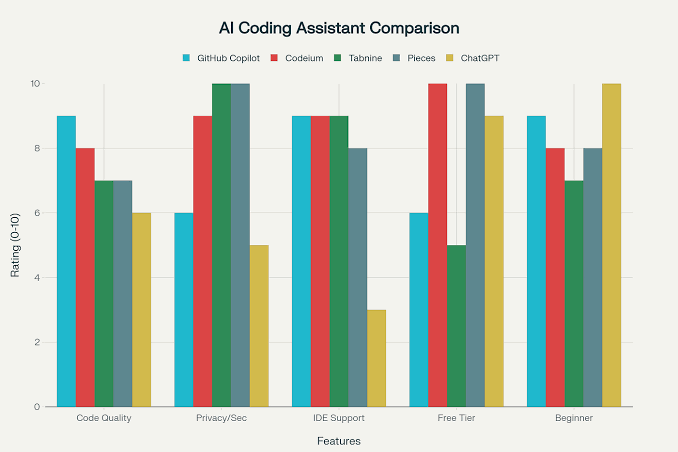
Artificial intelligence has transformed software development, making coding faster, more efficient, and accessible to developers of all skill levels. From generating code snippets to debugging complex applications, AI-powered coding assistants have become essential tools in modern development workflows. With so many options available, choosing the right one can be challenging.
- AI Coding Assistant Comparison at a Glance
- Why Use an AI Coding Assistant?
- AI Coding Assistant Comparison: Top Tools
- Feature Comparison
- How to Choose the Right AI Coding Assistant
- Choose GitHub Copilot if:
- Choose ChatGPT if:
- Choose Google Gemini Code Assist if:
- Choose Amazon Q Developer if:
- Choose Cursor if:
- Choose Tabnine if:
- Best AI Coding Assistant for Different Users
- Frequently Asked Questions
- What is the best AI coding assistant?
- Are AI coding assistants free?
- Can AI coding assistants replace developers?
- Which AI coding assistant is best for beginners?
- Conclusion
This AI Coding Assistant Comparison examines the leading AI coding tools, highlighting their features, strengths, limitations, pricing, and ideal use cases. Whether you’re a beginner learning to code or an experienced software engineer, this guide will help you select the AI assistant that best fits your needs.
AI Coding Assistant Comparison at a Glance
| AI Coding Assistant | Best For | Key Strength | Free Plan |
|---|---|---|---|
| GitHub Copilot | Professional developers | Code completion & IDE integration | Limited trial |
| ChatGPT | Coding, debugging & explanations | Natural language assistance | Yes |
| Google Gemini Code Assist | Google ecosystem users | Cloud & enterprise integration | Yes (varies by plan) |
| Amazon Q Developer | AWS developers | Cloud application development | Yes |
| Cursor | AI-first coding experience | AI-powered code editor | Yes |
| Tabnine | Privacy-focused teams | Local AI models & security | Yes |
Why Use an AI Coding Assistant?
AI coding assistants are designed to improve productivity by helping developers write, review, and maintain code more efficiently.
Key benefits include:
- Faster code generation
- Automatic code completion
- Bug detection and debugging support
- Code refactoring suggestions
- Documentation generation
- Learning support for beginners
- Improved developer productivity
As AI continues to evolve, these tools are becoming valuable collaborators rather than simple autocomplete engines.
AI Coding Assistant Comparison: Top Tools
GitHub Copilot
GitHub Copilot is one of the most widely used AI coding assistants. Developed by GitHub in collaboration with OpenAI, it integrates seamlessly with popular IDEs such as Visual Studio Code, JetBrains IDEs, and Visual Studio.
Key Features
- Intelligent code completion
- Multi-language support
- Test generation
- Code explanations
- GitHub integration
Pros
- Excellent IDE integration
- Supports many programming languages
- Speeds up repetitive coding tasks
Cons
- Subscription required after the trial
- Suggestions should always be reviewed for accuracy
ChatGPT
ChatGPT is much more than a code generator. It can explain programming concepts, debug errors, generate code, write documentation, and help developers understand unfamiliar frameworks.
Key Features
- Natural language coding assistance
- Bug fixing
- Code optimization
- Documentation writing
- Algorithm explanations
- Multi-language support
Pros
- Excellent for learning
- Strong debugging capabilities
- Handles both simple and complex programming tasks
Cons
- Does not directly integrate into every IDE
- Developers should verify generated code before deployment
Google Gemini Code Assist
Google Gemini Code Assist is designed to help developers working with Google Cloud and modern application development.
Key Features
- AI code suggestions
- Google Cloud integration
- Enterprise support
- Security recommendations
Pros
- Strong cloud development features
- Good integration with Google services
Cons
- Best suited for users already invested in Google’s ecosystem
Amazon Q Developer
Amazon Q Developer focuses on developers building applications within AWS environments.
Key Features
- AWS optimization
- Infrastructure assistance
- Security guidance
- Code generation
Pros
- Excellent for cloud-native applications
- Helpful AWS documentation support
Cons
- Less useful for developers outside AWS
Cursor
Cursor is an AI-first code editor that integrates conversational AI directly into the coding experience.
Key Features
- AI-powered editing
- Project-wide code understanding
- Inline code generation
- Refactoring assistance
Pros
- Designed specifically for AI-assisted development
- Fast workflow improvements
Cons
- Requires adapting to a new editor if you’re switching from another IDE
Tabnine
Tabnine emphasizes privacy and security, making it popular with enterprise teams.
Key Features
- AI code completion
- Local deployment options
- Enterprise security
- Team collaboration
Pros
- Strong privacy controls
- Good enterprise support
Cons
- Some advanced features require a paid subscription
Feature Comparison
| Feature | Copilot | ChatGPT | Gemini Code Assist | Amazon Q | Cursor | Tabnine |
|---|---|---|---|---|---|---|
| Code Generation | ✅ | ✅ | ✅ | ✅ | ✅ | ✅ |
| Debugging | ✅ | ✅ | ✅ | ✅ | ✅ | Limited |
| Code Explanation | Limited | ✅ | ✅ | ✅ | ✅ | Limited |
| IDE Integration | Excellent | Limited | Good | Good | Built-in | Excellent |
| Cloud Support | Good | General | Excellent | Excellent | Good | Good |
| Learning Support | Good | Excellent | Good | Good | Good | Moderate |
How to Choose the Right AI Coding Assistant
The best choice depends on your workflow and goals.
Choose GitHub Copilot if:
- You primarily work inside an IDE.
- You want fast code completion.
- You write production code daily.
Choose ChatGPT if:
- You want detailed programming explanations.
- You need debugging help.
- You’re learning new languages or frameworks.
Choose Google Gemini Code Assist if:
- You build applications on Google Cloud.
- You use Google’s development ecosystem.
Choose Amazon Q Developer if:
- Your projects rely heavily on AWS.
- You need cloud infrastructure guidance.
Choose Cursor if:
- You want an AI-native coding experience.
- You’re open to using a dedicated AI code editor.
Choose Tabnine if:
- Privacy is a priority.
- Your organization requires secure AI deployment.
Best AI Coding Assistant for Different Users
| User Type | Recommended Tool |
|---|---|
| Beginners | ChatGPT |
| Professional Developers | GitHub Copilot |
| Cloud Developers (Google) | Gemini Code Assist |
| AWS Developers | Amazon Q Developer |
| AI-First Workflow | Cursor |
| Enterprise Teams | Tabnine |
Frequently Asked Questions
What is the best AI coding assistant?
The best tool depends on your needs. GitHub Copilot excels in IDE integration, while ChatGPT is ideal for explanations, debugging, and learning.
Are AI coding assistants free?
Many tools offer free plans or limited trials. Advanced features typically require a subscription.
Can AI coding assistants replace developers?
No. AI coding assistants improve productivity but still require developers to review, test, and maintain code.
Which AI coding assistant is best for beginners?
ChatGPT is an excellent choice because it explains concepts, helps debug code, and answers programming questions in plain language.
Conclusion
This AI Coding Assistant Comparison shows that there is no one-size-fits-all solution. GitHub Copilot is a strong option for professional developers who want seamless IDE integration, while ChatGPT stands out for its ability to explain code, troubleshoot issues, and support learning. Google Gemini Code Assist and Amazon Q Developer are excellent choices for cloud-focused workflows, Cursor offers an AI-native editing experience, and Tabnine is well suited for teams that prioritize privacy and security.
Before choosing a tool, consider your programming language, preferred development environment, budget, and the type of projects you work on. As AI continues to advance, these assistants will play an increasingly important role in helping developers write better code, solve problems faster, and stay productive.